Instagram Video Downloader
Download supported public Instagram videos by pasting the video's URL into InstaFetch. Available media can be previewed before downloading.
InstaFetch is a free online Instagram downloader for supported public Instagram videos, Reels, and photos. Paste an Instagram URL to check available media and download it directly from your browser.
No Instagram login required. No software installation required.
InstaFetch Features
InstaFetch is a free online tool for downloading supported public Instagram videos, Reels, and photos directly from your browser.
Download supported public Instagram videos by pasting the video's URL into InstaFetch. Available media can be previewed before downloading.
Save supported public Instagram Reels directly from your browser. Copy the Reel URL, paste it into InstaFetch, and download the available media.
Download supported public Instagram photos from a URL without installing additional software or signing in to Instagram.
InstaFetch does not require you to enter your Instagram username or password to use the downloader.
Use InstaFetch on desktop, tablet, or mobile through a modern web browser. No dedicated application is required.
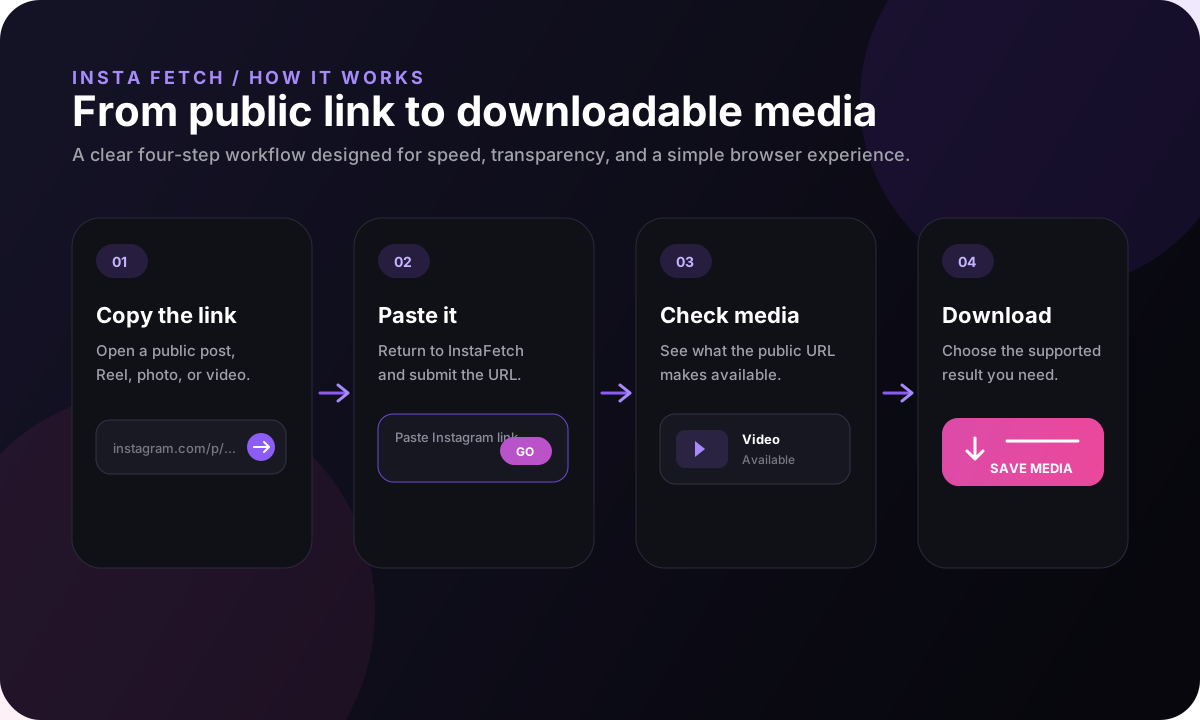
Copy a supported public Instagram URL, paste it into InstaFetch, check the available media, and download it.
How InstaFetch Works
InstaFetch uses a simple URL-based workflow for supported public Instagram videos, Reels, and photos.
Open a supported public Instagram video, Reel, or photo and copy its URL from Instagram.
Paste the Instagram URL into the InstaFetch downloader on this page and start the download process.
InstaFetch checks the URL and displays available downloadable media when supported content can be accessed.
Preview the available media and select Download to save the supported video, Reel, or photo to your device.
InstaFetch does not require an Instagram password or dedicated application. Availability depends on whether the supplied Instagram URL contains supported public content that can be accessed.
InstaFetch resource center
A useful downloader should explain what it can process, why a public link can still fail, and what happens between the Instagram URL and the file saved on your device. This guide is written for those practical questions instead of repeating the same keyword across nearly identical pages.
Use the Reel or video URL when you have a single short-form video. InstaFetch identifies the available video media and gives you a browser download without requiring an Instagram password.
Open the related tool →For a public photo post, InstaFetch checks the supplied post URL and returns the image media that can be processed. A post can still fail when access has changed or the content is no longer available.
Open the related tool →Carousel URLs can contain multiple images or videos. When multiple files are returned, InstaFetch shows each item separately and provides a Download All option for supported results.
Open the related tool →InstaFetch starts with a validation step. The submitted address must use HTTPS and point to an Instagram content URL that the service is designed to process. Rejecting unsupported links early matters because it prevents unnecessary network requests and gives the user a useful answer instead of a generic server error.
The service then resolves the public media associated with that post. A modern downloader cannot safely assume that the visible Instagram page URL is the same thing as the final media file. The application therefore treats the Instagram address as the source of the request and separately resolves the media that can actually be delivered.
Once media is available, InstaFetch keeps the result separate from the original page navigation. The download button requests the already-resolved media instead of starting a second Instagram lookup. This makes repeated clicks more predictable and helps avoid the common failure where a temporary source URL changes between the preview and download step.
For multi-item results, each file is represented independently so an image and a video can be handled according to its own type. The interface also exposes dimensions and file information when that metadata is available.
The fastest way to solve a failed download is usually to diagnose the source URL first rather than repeatedly submitting the same request.
Public media is not always delivered the same way. The first request may need to resolve the current media source before a stable download can be prepared. Keep the original post URL, avoid repeatedly clicking the button, and try again when the post is publicly accessible.
The URL may point to a private or removed post, an unsupported Instagram page, or content that is currently inaccessible to the downloader. Confirm the link opens normally in your browser and is a direct post, Reel, or video URL.
A download should be validated as media before the browser receives it. If a file does not open, do not rename it randomly or keep retrying the same broken link. Submit the original Instagram URL again so a fresh media source can be checked.
The file format comes from the media source that can be processed. Video results are normally delivered as a browser-playable video file, while image results are delivered in an image format supported by the source. The service does not invent a higher-quality copy that Instagram did not make available.
For that reason, the safest quality promise is transparent metadata rather than advertising a universal "original" or "4K" mode. When dimensions or file size are known, InstaFetch shows them with the result so you can understand what you are downloading.
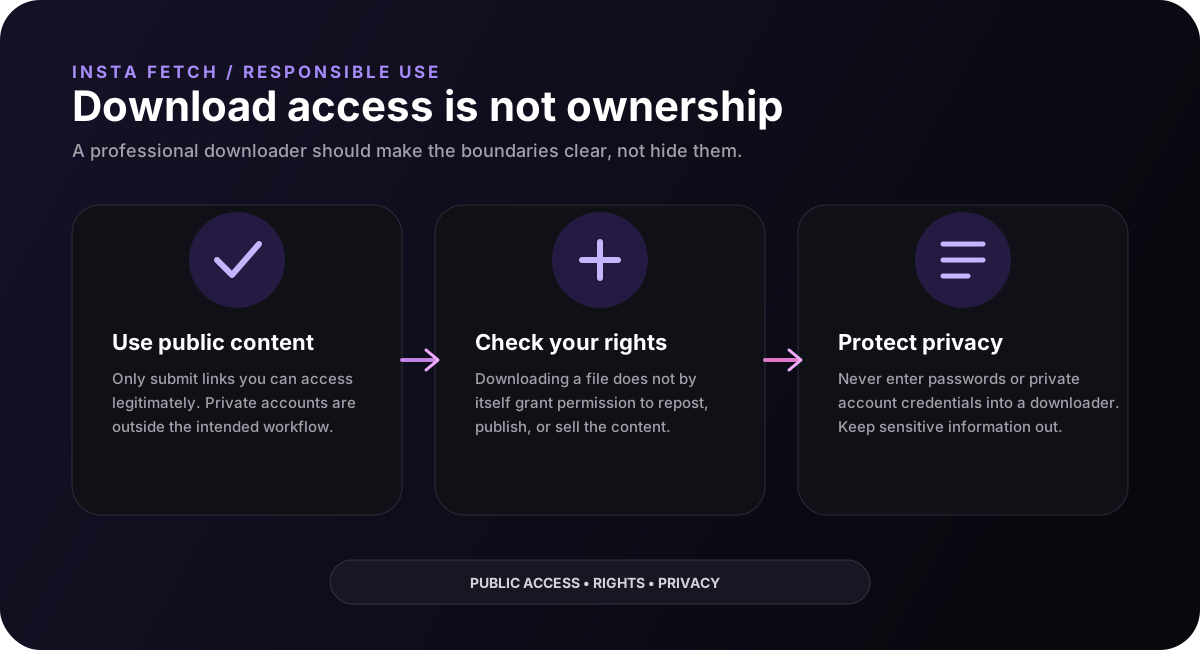
A technical ability to download a public file is different from permission to republish it. Creator rights, copyright, privacy, publicity rights, and local laws can apply to downloaded material.
InstaFetch is an independent utility. Instagram and Meta are not affiliated with or endorsing this service, and the InstaFetch workflow is intended for supported public content only.
Beyond the download button
People rarely need only a file. They also want to know whether the link is public, why a carousel produced several items, why a video looks different on a desktop screen, which version is practical to save, and what rights may apply after the download.
That is why InstaFetch pairs the downloader with explanatory resources. The goal is to help visitors make a clear decision about the media they are working with instead of sending every question to another search result.
InstaFetch Resource Center
A downloader is only useful when the page around it answers the questions people have before, during, and after a download. This guide explains the workflow, media quality, browser behavior, common limitations, and responsible reuse in plain language.
Start with a post or Reel that is publicly viewable in a normal browser session.
Review the media items returned before choosing a file to save.
Think about resolution, file size, device storage, and intended use.
InstaFetch starts with the URL you provide. The service checks that the address is an Instagram post, Reel, or supported video/photo URL and then looks for media that is publicly accessible through the page. The important distinction is that the downloader is checking availability; it is not unlocking a private account or bypassing an access control.
When a public page exposes downloadable media, the result can contain a video, an image, or several items from a carousel. A carousel is treated as a set of media rather than forcing the user to repeat the request for every item. That makes the result easier to inspect before anything is saved.
The browser then receives the media information needed to choose a file. Keeping this step visible helps users understand what was actually found instead of presenting a generic button with no context.
The most dependable starting point is the original share link for the post or Reel. Copy it from Instagram's share controls instead of copying text from a browser search result, a shortened message, or a page that has been wrapped by another service.
A clean URL also makes troubleshooting easier. If a result fails, you can compare the submitted address with the address shown on Instagram and remove accidental spaces or extra tracking parameters. InstaFetch normalizes supported URLs before processing them.
For a carousel, use the URL of the carousel itself. The service can then inspect the group of media items together and return the available images or videos as one result set.
Public visibility is a useful starting condition, not a guarantee that a file will always be available to a third-party downloader. A post can be deleted, changed to private, restricted by the platform, unavailable in the current delivery path, or served in a format the current resolver cannot process.
Availability can also change over time because the underlying media delivery system changes. A URL that worked last week may expose a different set of resources today. Good user-facing copy should acknowledge that limitation instead of promising that every Instagram link will work forever.
When a result is missing, the practical next step is to confirm that the content is still public, copy the original link again, and retry once. If the post remains inaccessible, there may simply be no public downloadable media available through the current delivery path.
For a single video or photo, the choice is usually straightforward. Carousels are different because a single URL can represent several media items, and some items may be videos while others are photos. Reviewing the returned list lets you choose exactly what you need.
For video, the largest available rendition is not automatically the best choice for every person. A higher-resolution file can be useful for editing or archiving, while a smaller file may be faster to move to a phone or share with another device.
For photos, dimensions matter alongside visual quality. A very large image may be useful for cropping, while a smaller version may be enough for a screen background or quick reference.
Good practice
Being able to download a public file does not automatically give you permission to repost, sell, edit, or commercially distribute someone else's work. Copyright, privacy, publicity rights, and platform rules can still apply to what you do with the file.
Choose a workflow
Start with the page that matches the content you are working with. Each guide explains the practical details that are most relevant to that format.
Video
Learn about resolution, bitrate, audio, portrait footage, file size, and sensible archiving for supported public videos.
Open video guide →Reels
Understand portrait composition, audio, public availability, source context, and what to check before reusing a Reel.
Open Reel guide →Photos
Learn how image dimensions, compression, carousels, file organization, and source context affect a photo download.
Open photo guide →Practical guide
A useful download workflow starts before the file reaches your device. First check the source URL and make sure it points to the public post you intended to view. For videos, look at the visible orientation, expected quality, and whether the audio is important to your use case. For photos and carousels, confirm that the returned set contains the images you expected rather than assuming a single preview represents the entire post.
It is also worth separating technical access from permission. A public page can expose media to a browser while the creator still retains copyright or other rights in the work. Saving a file for personal reference is different from reposting it, building a commercial library from it, or presenting it as your own. The safest workflow is to keep the original source context and obtain permission when your planned use requires it.
Use the original public post or Reel URL and make sure the page is still accessible.
For carousels, verify all returned items; for video, consider orientation and available quality.
Preserve the source information and check copyright or permission before public reuse.
Transparency
InstaFetch is intended for supported public Instagram media. A page can still fail to resolve when a post is private, deleted, restricted, unsupported, or no longer exposing a compatible public rendition. Platform delivery systems can also change, so a successful result today is not a promise that the same URL will remain downloadable forever.
The site does not ask users to submit Instagram passwords. It is also not affiliated with Instagram or Meta. These boundaries are part of the product: users should know what the tool does, what it does not do, and what responsibility remains with them after a file is saved.
InstaFetch FAQ
Learn how InstaFetch works, what Instagram content it supports, and what you need to use the downloader.
InstaFetch is a free online Instagram downloader for supported public Instagram videos, Reels, and photos. It lets users check available media from a supported Instagram URL and download it directly from a web browser.
Copy the URL of a supported public Instagram video, Reel, or photo and paste it into the InstaFetch downloader. InstaFetch checks the URL and displays available media when downloadable content is found.
Yes. InstaFetch supports downloading supported public Instagram Reels. Copy the Reel URL, paste it into InstaFetch, and download the available media.
Yes. InstaFetch supports downloading supported public Instagram videos. Paste the video's Instagram URL into the downloader to check whether downloadable media is available.
Yes. InstaFetch supports downloading supported public Instagram photos when downloadable media is available from the supplied URL.
No. InstaFetch is designed to work without requiring users to enter their Instagram username or password.
No. InstaFetch is a browser-based service. You can use it from a supported desktop, tablet, or mobile web browser without installing a dedicated application.
Yes. InstaFetch is free to use for supported public Instagram media.
Yes. InstaFetch is designed to work through modern mobile web browsers as well as desktop browsers.
Not every Instagram URL can be processed. Content may be private, unavailable, unsupported, restricted, or otherwise inaccessible. InstaFetch only provides downloadable media when it can successfully access supported content.
No. InstaFetch does not require you to provide an Instagram username or password to use the downloader.
Users should only download and use content they have permission to save or reuse. Copyright, privacy, and other applicable laws and platform terms can apply to downloaded content. InstaFetch does not grant permission to reuse someone else's content.