01
Choose the right source
Use the original public post, Reel, or carousel URL. That keeps the request tied to the page you actually want to save.
InstaFetch
Use InstaFetch as a starting point for supported public Instagram videos, Reels, photos, and carousel posts. The page is built around a simple workflow, but the service also explains what happens to the URL, how media quality works, why some links are unavailable, and what to consider before reusing a saved file.
Try a supported public Instagram URL
01
Use the original public post, Reel, or carousel URL. That keeps the request tied to the page you actually want to save.
02
A result can contain one file or several. Checking the returned media helps prevent accidental downloads of the wrong item.
03
For important files, keep the source URL and any notes about your intended use alongside the saved media.
Instagram Downloader Guide
Instagram links can point to a single photo, a video, a Reel, or a carousel containing several pieces of media. This guide explains what changes between those formats and how to use a downloader without confusing access with ownership.
A single public post can expose one image, one video, or a group of media items.
A Reel is treated as video content and is resolved through a dedicated public-media path.
A carousel can return several items, allowing the user to review the set before saving.
A common assumption is that an Instagram URL maps directly to one downloadable object. In practice, a post can contain multiple media items. A carousel may combine photographs and videos, so the downloader needs to return a collection rather than treating the first item as the entire post.
That distinction matters for users who want to save a complete set. Seeing all available items in one place reduces the chance of missing the second, third, or later part of a carousel. It also gives the user a chance to decide which files are relevant instead of downloading everything automatically.
For a simple single-media post, the interface should feel lighter. For a multi-item post, the interface should expand naturally to show the collection without making the user repeat the same URL.
A professional downloader should preserve the relationship between the resulting file and the page it came from. That is why InstaFetch keeps the source URL associated with the returned media information. It gives users a useful reference if they need to revisit the original post later.
Keeping the source visible is also helpful when a file needs to be credited, discussed with a teammate, or checked against the creator's original version. The URL is not a replacement for permission, but it is valuable context.
For troubleshooting, the source URL also makes errors easier to understand. If the original post has disappeared or changed access settings, the reason for a failed result is more apparent.
InstaFetch is designed for supported public Instagram content. It does not require an Instagram password and it does not present itself as a way to enter private accounts. The service only returns media that its current resolver can access and process.
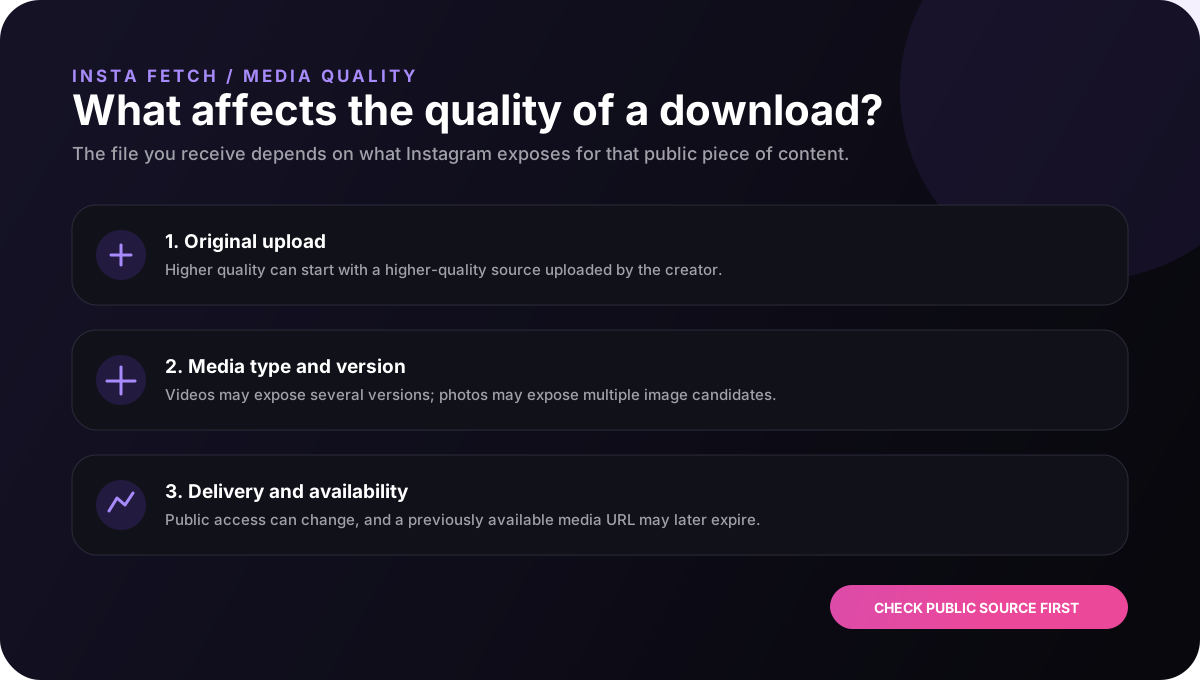
That means a user should treat the availability notice as a real-time result rather than a permanent guarantee. Platform changes, post changes, expired media URLs, and unsupported content types can all affect what is returned.
This transparency is important for a high-quality utility site. Clear limitations are more useful than marketing copy that promises universal access and leaves users confused when a particular URL does not work.
Many people do not download a file just to store it. They may be collecting references for a project, keeping a backup of their own public post, preparing a video edit, saving an image for offline viewing, or organizing examples for research or design work.
For those workflows, file naming and organization become more important than the download button itself. A useful habit is to keep related media in a dated folder, preserve the original source URL in your notes, and avoid creating several ambiguous copies of the same file.
When a download is part of a professional project, keep a record of where the media came from and what permission or license applies. That small step can save time later when the same asset needs to be reviewed or removed.
Good practice
A high-standard downloader should tell users what it supports, show what it found, and explain why a result might not be available. Those details are part of the product experience, not filler around the tool.
A better way to use the tool
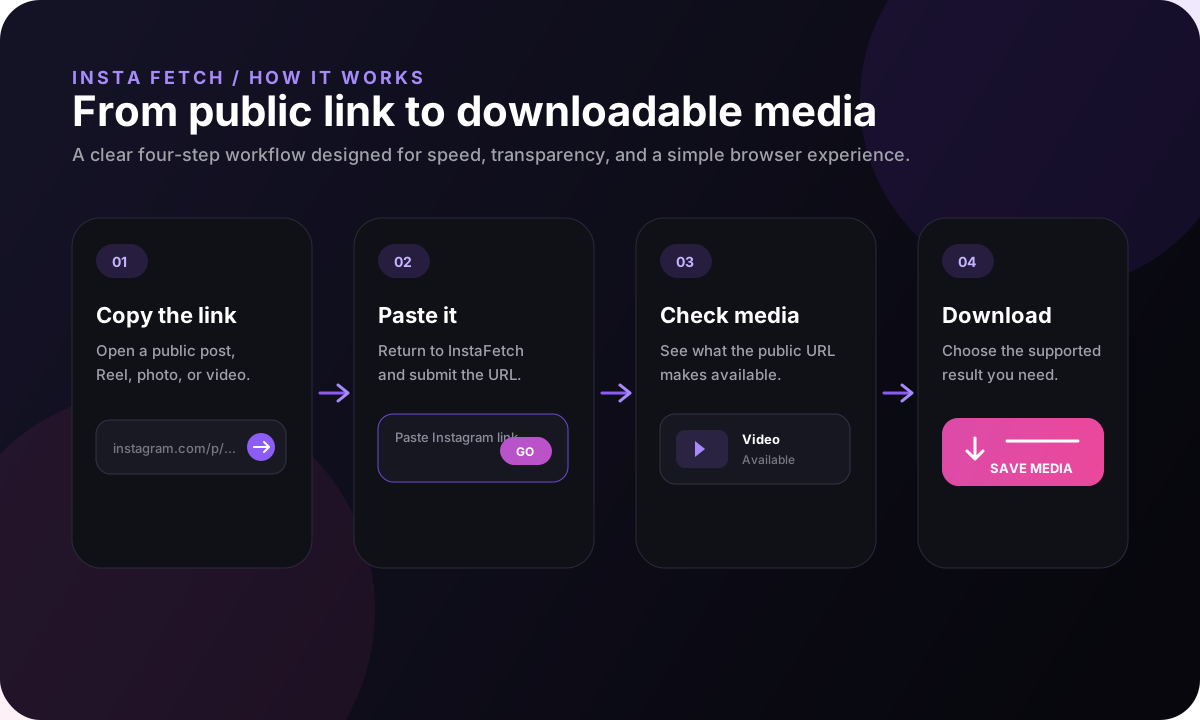
A polished utility should not make users guess what a button will do. InstaFetch separates the steps so the user can identify the source, submit it, inspect the returned media, and then decide what to save. That approach is useful whether the task takes ten seconds or is part of a larger research or creative workflow.
For repeat use, simple habits make the process more organized. Keep a folder for saved assets, note the source URL for files that matter, and avoid retaining unnecessary copies. For shared work, add context such as why the file was collected and whether a permission or license applies.
These details matter because a downloader is not just a retrieval mechanism. It sits between a public web page and a user's next action, so the surrounding product should make both the capabilities and the limits easy to understand.
FAQ
InstaFetch is designed for supported public Instagram posts, including videos, Reels, photos, and multi-item carousel posts.
No. InstaFetch is designed around a public URL workflow and does not ask you to enter an Instagram username or password.
Yes. A public carousel can contain several media items, so a single URL may produce a multi-item result rather than one file.
A post may have been deleted, made private, restricted, changed, or delivered in a format that the current resolver cannot process.
No. Access to a file and the right to reuse it are different questions. Check copyright, privacy, creator rights, and any permission needed for your intended use.